AI Resume Formatting Tool for
HR & Recruiters
CV Converter transforms candidate resumes into your company's branded CV format automatically: no copy-pasting, no manual formatting.
Helps recruiters save time, maintain consistent formatting, and avoid manual errors.
30 free conversionsfor new users, no credit card required
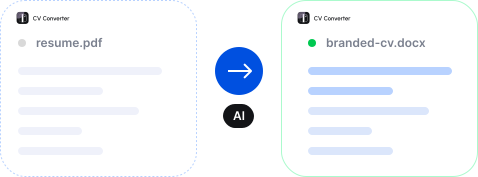
Stop Manually Formatting Candidate CVs
Manual CV formatting services are not sustainable. CV Converter solves the most common challenges of preparing CVs in a client-ready format.

Time-Consuming Resume Formatting
Minimize CV formatting time and let recruiters focus on people, not paperwork.

Monotony and Low Engagement
Delegate repetitive tasks to AI, allowing your team to focus on higher-value strategic work.

Risk of Errors
Our CV formatting tool reduces the chance of grammar mistakes and typos, ensuring consistent, error-free resumes.

Inconsistent Branding
Maintain a consistent corporate style across all resumes, boosting your company's professionalism and brand recognition.

Involving Many Employees
Eliminate the need for multiple reviews and approvals by ensuring every resume meets brand and formatting standards automatically.

Low Presentation Quality
Make strong first impressions by delivering candidates in professionally formatted, brand-consistent CVs.
Meet the AI CV Formatting Tool Built for Recruiters
Source the best talent. We'll handle CV formatting.
- Reads your Google Docs CV template and creates a copy in a selected folder for future conversions, together with saved instructions
- Preserves document structure, formatting, and styles
- Recreates header and footer elements
- Generates a properly formatted CV automatically

How It Works
Set up your branded template first, then convert candidate CVs with one click in seconds.
Upload Template
Select your branded CV template from your Google Drive.
Set Up the Instructions
Generate the instructions that describe your template to ensure accurate conversions.
Add a Resume and Convert
Upload the candidate's resume in PDF format and start the conversion.
Get a Branded CV
The result is automatically saved to your Google Drive.
How to Prepare Your CV Template
To ensure your template works correctly with CV Converter, follow these four steps carefully.

Create or Upload in Google Docs
The template must be a Google Docs file: created directly in Google Docs or uploaded as .docx and converted.

Logo in Header or Footer Only
Place logos and decorative images only in the header or footer, never inside the document body.

Use Heading Styles
Apply built-in Heading styles for section titles and regular paragraph style for body text.

Save and Convert
Once your template follows these rules, our resume formatting software can accurately preserve its structure and formatting.
- Google Docs format (.docx converted)
- Heading styles for section titles
- Logo placed in Header or Footer only
- Consistent paragraph styles throughout
- Images inside the document body
- Inconsistent or missing heading styles
- Inline-only text styling
- Non-Google Docs formats (Word, PDF)
Need a detailed walkthrough?
Full Setup GuidePowerful CV Formatting Software Features
CV Converter is an AI resume formatting tool that helps recruiters and HR teams automate one of the most repetitive parts of the hiring workflow.

AI-Powered CV Transformation
Automatically converts raw CV content into a structured document that matches your predefined template.

Template-Based Formatting Engine
Reads formatting, styles, and structure from your Google Docs template and recreates them in the generated CV.

Structure Recognition
Identifies key CV sections (experience, education, skills, etc.) and maps them to the correct blocks in your template.

Header & Footer Rendering
Reproduces template header and footer elements, including images, logos, and background styling.

Instruction-Based Conversion Control
Allows users to define or edit instructions that guide how each CV section should be interpreted and formatted.

Google Drive Integration
Converted CVs are automatically saved in a folder you choose. Your data stays with you.
Built for Recruitment Teams and Agencies
Our CV formatter solves a real problem many recruiters face.

Recruiters Handling High Volume
Save time formatting a CV when handling dozens of candidates every day. Use AI resume formatting to convert files into a standardized format without relying on a CV formatting agency, and focus on sourcing, screening, and communication instead of document preparation.

Recruitment / Staffing Agencies
Prepare client-ready CVs faster and keep consistent branding across all submissions. CV Converter works like an automated CV formatting service, helping agencies standardize candidate documents without manual work.

HR Teams
Automatically generate structured CVs that follow company standards. The tool functions like an internal CV formatting company, reducing manual formatting, ensuring consistency, and helping reduce costs.

RPO Providers
Automate CV preparation across multiple clients and templates. CV Converter scales like professional CV formatting companies, enabling fast candidate delivery with consistent branding.
Secure and Private Resume Formatting
Built with privacy in mind to support recruiters' daily workflows.

Your data stays with you
We do not store your templates or CVs. Everything remains in your Google Drive.

No rewrites, only formatting
The AI resume formatter only structures and formats existing content.
Integrated with Google Drive
Converted CVs are automatically saved in a folder you choose.
Set up your template and convert your first CV now.
New users receive 30 free conversions.
Affordable Options for Every Team
Choose between a monthly subscription or pay-per-conversion credits for AI resume formatting tool depending on your needs.